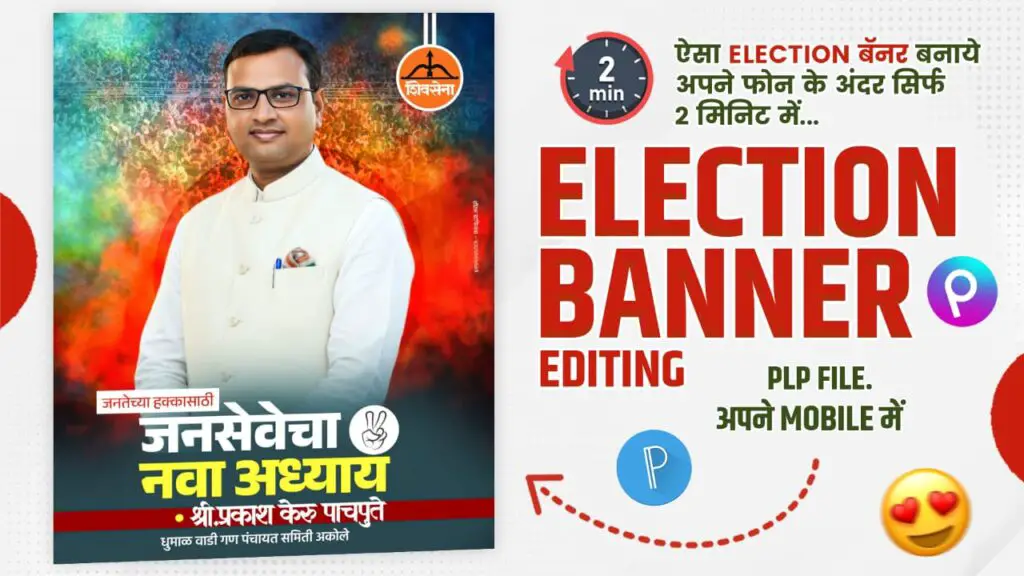
🗳️Election Banner Editing Kya Hai? Aur Kyu Important Hai? 🤔
💥Election Banner Editing 2025 me aaj hum seekhenge kaise aap apne mobile phone se professional political banner bana sakte hain — wo bhi sirf 2 minute me! 🎨📱 Aaj ke digital yug mein, har political campaign ka sabse pehla step hota hai — banner aur poster design! 💫 Election ke time har neta, party worker aur supporter apna message, apna vision aur apna personality dikhane ke liye digital poster ka use karta hai. Pehle ye kaam sirf professional designers karte the 💻, jinke liye computer, Photoshop aur time sab kuch chahiye hota tha. Lekin ab scene badal gaya hai! 🚀
Ab aap sirf mobile se, apps jaise PixelLab aur PicsArt ke through, professional election banners bana sakte ho. Chahe aap Shiv Sena, BJP, Congress ya kisi bhi local ward election mein ho, aapka banner ab sirf 2 minute mein ready ho sakta hai! ⏱️
Yahan tak ki aapko sirf ek PLP file chahiye hoti hai – jisme ready-made template hota hai. Bas text badlo, photo daalo aur background effect laga do 💥 – banner ready! Is tarah aap apna digital identity aur professional image dono bana sakte ho. 😎
📸Kaise Banaye Election Banner Mobile Se? Step-by-Step Guide! 📱🔥
Sabse pehle, PixelLab app download karo 📲. Uske baad, election banner ke liye diya gaya PLP file open karo. Ye file ek tarah ka editable design hota hai jisme sab layers already set hoti hain — background, photo frame, logo, slogan, aur font styles! 😍
👉 Step 1: Apni party ka symbol aur color theme set karo (jaise saffron for Shiv Sena, green for NCP etc).
👉 Step 2: Apni photo ko cutout tool se crop karke place karo — pro look ke liye light shadow aur glow effect lagao ✨
👉 Step 3: Apne naam ke niche likho kuch impactful lines jaise – “Jansevecha Nava Adhyay”, “Vikasachi Nayi Pahchan” ya “Aaplya Hakacha Nayak” 🙌
👉 Step 4: Background mein crowd, gradient aur lighting effects lagao, jo banner ko ek energetic election feel de ⚡
Aur bas! Banner ready hai — ab aap ise directly social media (Facebook, WhatsApp, Instagram) par share kar sakte ho aur apni pehchan bana sakte ho 📢🎯
🧠Tips, Design Ideas aur Viral Hone Ke Secrets 💡🔥
Agar aap chahte ho ki aapka election banner viral ho, to kuch secret tricks zaroor follow karo! 😎
💡 1. High-Contrast Colors Use Karo: Bright background jaise orange, blue aur yellow aapke photo aur text ko highlight karte hain.
💡 2. Font Style Simple aur Bold Rakho: Political banners mein readability sabse important hoti hai, toh fancy fonts avoid karo.
💡 3. Party Symbol Aur Slogan Always Add Karo: Ye audience ko instantly connect karte hain ❤️
💡 4. Emotions Dikhane Wale Emojis Aur Stickers Lagao: Jaise ✊🔥✨ ye energy aur power show karte hain.
💡 5. Share Timing: Banner ko subah 8-10 ya shaam 6-9 ke beech post karo — tab social media par engagement sabse zyada milti hai 📈
Is tarah, aap apne mobile se hi ek digital campaign expert ban sakte ho! 🚀 Chahe Gram Panchayat election ho ya MLA campaign, ek smartly edited banner aapke image ko 10x boost karta hai. 💥 Aaj ke time par, jo digital banner pehli nazar mein impact karta hai, wahi voter ke dil tak pahunchta hai ❤️🗳️
——————————–••••••——————————-
🏆Election Banner Design Mein Professional Touch Kaise Layein? 💪✨
Election banner ek aisa poster hota hai jo pehli nazar mein impression create karta hai. 😍 Isliye agar aapko apne banner ko doosron se alag banana hai to usme professional touch bahut zaroori hai! Aap chahe mobile use kar rahe ho, lekin agar design me finishing aur balance ho to wo banner computer-made lagta hai! 💻
Sabse pehle background ka dhyaan rakho 🎨 – use me mix gradient color lagao jaise orange + red, blue + white, ya green + yellow. Ye contrast voter ki aankhon ko instantly attract karta hai 👁️✨.
Photo ke aas-paas light vignette effect ya outer glow lagane se subject highlight hota hai. Aap “Janseva”, “Lokpriya Neta”, “Vikasachi Nayi Disha” jaise slogans use kar sakte ho jo emotionally connect karte hain ❤️.
Aur ek pro tip 😎 – hamesha apni photo ke peeche party crowd effect ya flag overlay lagao, jisse banner mein motion aur energy ka feel aaye 🔥.
Aaj kal AI tools aur PLP templates ne design banana aur bhi easy kar diya hai — bas creativity aur thoda time do, banner aapka “Election Ready” ho jayega! 🚀
🎯Social Media Pe Election Banner Ko Viral Kaise Karein? 📱💥
Banner banana ek part hai, lekin usse viral karna art hai! 😉
Aap chahe PixelLab se banner banao ya PicsArt se edit karo, uske baad aapka next step hota hai promotion aur timing. Sabse pehle banner ko Facebook groups, WhatsApp status aur Instagram Reels pe post karo 🕒 — par dhyaan rahe, posting ka time subah 8-10 aur shaam 7-9 baje best hota hai ⏰.
Caption mein likho kuch catchy lines jaise 👉 “Jansevecha Nava Adhyay – Aaplya Hakacha Nayak!” ya “Lokseva, Vikas Ani Vishwas!” 💫
Hashtags ka use karo jaise #ElectionBannerEditing #PixelLabPLP #PoliticalDesign2025 taaki search visibility badhe 📈.
Aur ek secret tip 💡 – apne design ka short video edit bana ke reels par dalo (with trending song 🎵), ye engagement 10x badha deta hai!
Aap chahe local neta ho ya supporter, jab aapka design professional aur energetic lagta hai, log instantly engage karte hain 😍🔥.
💡Trending Election Banner Ideas & Future Design Tips for 2025 🚀🗳️
2025 ke election banners sirf photo aur text tak limited nahi rahenge — ye creativity aur identity ka powerful combo ban gaye hain! 💥
Aaj kal log prefer karte hain minimal yet classy design, jisme clarity aur message dono ho. To kuch unique ideas yeh rahe:
⭐ 1. Transparent Logo Effect: Party ka logo halki transparency mein background me lagao — classy aur elegant lagta hai.
⭐ 2. Motion Blur Background: Jisme crowd thoda blur ho aur leader sharp focus me ho — voter ka focus seedha aap par aata hai 😎.
⭐ 3. 3D Name Effect: PixelLab me 3D text use karke apna naam bold aur powerful dikhayein.
⭐ 4. Dual Tone Lighting: Blue-Orange ya Red-Yellow lighting se poster me depth aur vibrancy aati hai.
⭐ 5. Motivational Quote Line: Jaise – “Janata Cha Nayak, Vikasacha Pathak!” 💪
Aise banners not only impress karte hain but logon ke mind me baith jaate hain ❤️.
👇TODAYS DESIGN👇
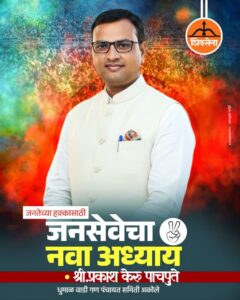
🏆Perfect Font Selection: Banner Ki Pehchaan! ✍️🎨
Bhai, banner editing me font style ka role sabse important hota hai 😎.
Agar text hi boring lag gaya to design ka impact half ho jaata hai 😅.
Isliye hamesha soch-samajh ke font choose karna chahiye.
Election banner me aise font chahiye jo bold aur readable ho – taaki door se bhi log easily padh sake 👀.
Best fonts jo mobile editing ke liye use ho sakte hain:
👉 Bebas Neue – power aur authority feel deta hai 💪
👉 Rajdhani – Indian vibe ke saath stylish look
👉 Montserrat Bold – modern aur clean
👉 Impact – classic aur attention-grabbing
Ek smart trick ye hai bhai 🔥 – candidate ka naam bada aur slogan chhota rakho.
Name ke liye bright color (jaise yellow ya white) use karo aur slogan ke liye thoda subtle tone (grey ya orange).
Text ke peeche thoda shadow ya stroke lagao taaki wo pop kare 💥.
Aur haan, har line ke beech me equal spacing rakhna na bhoolna – taaki design professional lage, crowded nahi 🧠.
Font ka magic hi design ko “poster” se “personality” me badal deta hai 😍.
🎆Background Design: Simplicity Is Power 💫
Bhai har koi flashy background lagata hai, par asli smart editing ye hai ki design simple aur clear lage ✨.
Background me zyada photo, pattern ya sticker daalne se attention divert ho jaata hai 😅.
Best practice ye hai – one focus point rakho, jaise candidate ka face ya party symbol 🎯.
Use gradient backgrounds – jaise orange to red, blue to white, ya green to yellow blends.
Ye soft transition design ko royal look deta hai 👑.
PixelLab me background editing easy hai – “Overlay”, “Gradient”, aur “Texture” options try kar.
Thoda “Blur” ya “Vignette” effect add karke depth do.
Agar tu realistic lighting add karega (jaise glow ya sunburst), to design aur premium lagega 🔥.
Aur bhai ek pro tip — agar banner me 3-4 log ho, to unke peeche ek transparent overlay lagao taaki sab equally visible rahein 👥.
Background simple rakho, focus main subject pe — bas wahi winning formula hai 💪.
——————————–••••••——————————-
🧠Lighting, Shadow Aur Finishing Touch: Pro Look Ka Secret ⚙️✨
Editing ka sabse bada charm hota hai – finishing touch!
Bhai, chaahe design simple ho, lekin agar lighting aur shadow sahi laga di to wo 10x professional lagta hai 😍.
PixelLab aur PicsArt dono me “Inner Shadow”, “Glow”, aur “3D Text” ka option milta hai – ye hi tools design ko pop karte hain 💥.
Example ke liye: agar banner ka background orange hai, to text ke niche light yellow glow lagao – itna classy effect aayega ki sab bolega “wah bhai, kya banner banaya!” 😎.
Candidate ke photo ke peeche soft shadow lagana mat bhool – ye realistic depth deta hai 📸.
Aur sabse zaruri, banner export karte waqt High Resolution (2048×2048 ya 300 DPI) me save karo.
Ye ensure karta hai ki print aur mobile dono version crystal clear lagen 🔍.
Thoda contrast aur brightness adjust karke final design ko polish karo – bas fir tera Election Banner 2025 viral look ready! 🚀
🧑🤝🧑🌍 TELEGRAM 🧑🤝🧑🌍

⛔ So guys, you will get all the editing apps, our updates, and banner materials like PLP, PNG, PSD, and much more on our Telegram channel. So make sure to join it! ⛔
——————————–••••••——————————
🔴 HD QUALITY MATERIAL 🔴
📌 HD PLP File 📌
📌 HD PNG File 📌
👇 OUR NEXT POST 👇
🎥 Reel Creator Banner Editing 2025: Create Professional Reels Posters on Mobile in Just 2 Minutes!